

Your tax form 281.45 available in your online portal (taxation year 2026)
April 26 2024

The annual tax declarations are coming up and you will need your tax form 281.45 (for the taxation year 2026, incomes of 2025). PlayRight has just made this form available for you in your online portal: to download it, log in and click on “Personal details” which you can find under the tab “Documents”.
This fiscal form contains the amount of neighbouring rights distributed to you by PlayRight in 2025. In order to complete your 2026 tax declaration, you will have to fill in the amounts indicated in the form 281.45.
ATTENTION: If another collective management society also distributed you copyrights and/or neighbouring rights, you must declare these in the same section.
Please note that you can complete your electronic tax declaration until July 15th via Tax on web. If you choose the standard paper declaration, you have until June 30th.
Useful information
We created some short guidelines to help you with the declaration of your rights, to be found by clicking on the following image:
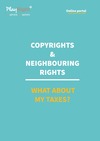
- You can also find it on our website via this page: https://playright.be/en/and-what-about-tax/
- Please note that since 2019, the Belgian tax administration no longer perceives your neighbouring rights as professional income, unless proven otherwise (learn more about this topic on this page).
Would you have any questions about this document, please do not hesitate to contact your Account Manager. For any other questions specific to your tax declaration, please contact SPF Finances directly, by calling 02/572.57.57.
Please note: Apple does not update versions that are no longer supported, and it can sometimes take some time before older versions that are still supported are updated. https://en.wikipedia.org/wiki/MacOS_version_history
If your operating system is older than OS X10.15.8, the browser will recognise many websites (including the portal) as unsafe. The solution is to upgrade the operating system. If the operating system cannot be updated, you can resolve the issue as follows: How to manually install the Securly SSL certificate for macOS